GPS-verified delivery tracking, built into your store. Tracking numbers auto-populate the moment you ship — and delivery confirmations write back to your orders.
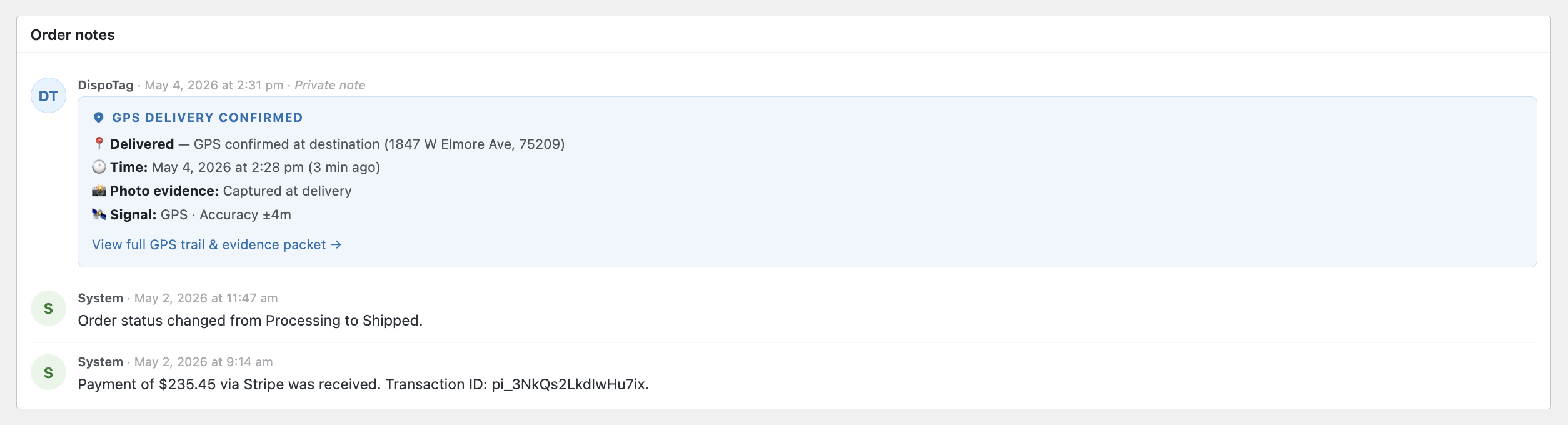
The moment DispoTag's GPS confirms delivery, a private note is automatically added to the WooCommerce order — no logging in, no manual checking.
Search for "DispoTag" in your WordPress plugin directory or upload the zip directly.
Go to WooCommerce → Settings → DispoTag and paste your DispoTag API key. That's the only credential you'll ever touch.
The plugin handles everything else — WooCommerce credentials are generated and exchanged automatically in the background.
Use any shipping plugin you already have. The moment tracking is added to an order, DispoTag syncs it automatically.
Carrier and tracking numbers flow from WooCommerce into DispoTag the instant an order ships.
When DispoTag's GPS confirms delivery, an internal note is automatically added to the WooCommerce order.
Every shipment gets a GPS trail and evidence packet, accessible in one click from the order note.
Compatible with WooCommerce Shipment Tracking, Advanced Shipment Tracking (AST), ShipStation, EasyPost, and more.
Fully compatible with WooCommerce's High-Performance Order Storage. Works with both classic and block themes.
No polling or cron delays. Tracking pushes to DispoTag immediately when it's added to an order.
The plugin is free. You need a DispoTag account and DispoTag hardware — that's it.